Sunday, May 22, 2016

SOLID - F# vs. C#


Do you want to write code that’s more testable, maintainable, extensible? Of course you do!

However much you think you already code in such a fashion, how many of you have worked on a shared codebase where:

  • a) there are so many thousands of classes, layers of indirection or abstraction that you just don’t know what does what?
  • b) a crisp, clean piece of architecture that you originally constructed has been slowly mangled by less experienced team members?
  • c) everything important goes through one massive ‘God class’ and you just know that what a change needs making, that class is the one to look at first?

I’m going to guess that most of you would put your hand up.

What if I told you there was a way to stop any of these things happening in your codebases? The traditional answer might be SOLID. Mine is functions. By the end of this post, I hope to have convinced you!


Background

Last week, I watched Mark Seemann’s excellent Pluralsight course on Encapsulation and SOLID.

It in, he talks about there being some duality between applying Uncle Bob’s SOLID principles of object-oreitned design, and using functional programming. He, and others, have also blogged in similar veins:

http://blog.ploeh.dk/2014/03/10/solid-the-next-step-is-functional/
http://gorodinski.com/blog/2013/09/18/oop-patterns-from-a-functional-perspective/
https://neildanson.wordpress.com/2014/03/04/it-just-works/

These posts have been pretty good in giving some idea as to why the two concepts are similar, but I want to approach the issue from another angle: learning.


The Woes of the Junior Developer

As someone that’s recently had to learn object-oriented programming (self-directed, from scratch), I can safely say I haven’t seen a ‘beginners’ guide to SOLID that has any chance of teaching an inexperienced developer how to write code that adheres to these principles.

It’s hard enough trying to write code in an existing codebase that matches whatever million-tiered architecture the original authors came up with, and to learn the right time to create an abstraction, how to use polymorphism effectively, ensure you are encapsulating things properly, etc.

Then, someone tells you that objects in a program should be replaceable with instances of their subtypes without altering the correctness of that program, and you think that’s all well and good, but what on earth does that mean in terms of real code?

The same applies in less or greater measure to the remaining four principles — they clearly work and result in maintainable, flexible, testable code, but when you’re starting down the barrel of a couple of million lines of someone else’s handiwork, it’s nigh-on impossible to figure out how to ‘solidify’ what you’re looking at.

On the other hand, I said before that there is a duality between SOLID and functional programming. So how easy is it to teach the relevant concepts in a functional language? The rest of this post will show you that the answer is: very!


Why does this matter?

I’ve just told you that you can get the same results (flexibility, testability, extensibility, maintainability, …) that applying the SOLID principles give, but do so in a way that’s


What’s up next?

I will now:

  • Give a very quick introduction to each of the SOLID principles.
  • Show an example of violating the principle in C#.
  • See how we can fix the problems using object-oriented code.
  • Present an alternative, functional approach in F#.
  • Explain why the functional approach is easier to learn and teach.

All of the code for the examples below can be found at https://github.com/douglasbruce88/SOLID


Single Responsibility Principle

What is it?

A class or module should one do one thing (and hopefully do it well!)

Give me an example of breaking it

The class below both counts the number of commas in a given string, and logs that number. It thus does two things.

public class DoesTwoThings
{
    public int NumberOfCommas (string message)
    {
        int count = 0;
        foreach (char c in message)
        {
            if (c == '/') count++;
        }
        return count;
    }

    public void Log (string message)
    {
        Console.WriteLine ($"The string you gave me has { NumberOfCommas(message) } commas");
    }
}
How can I fix it in C#?

Assuming that we actually wanted the class to do the comma counting, we use dependency injection to stick in a logger and delegate the logging functionality to that. This involves creating an interface, a non-default constructor, and a class field.

public class DoesOneThing
{
    readonly ILogger Logger;

    public DoesOneThing (ILogger logger)
    {
        this.Logger = logger;
    }

    public int NumberOfCommas (string message)
    {
        int count = 0;
        foreach (char c in message) {
            if (c == '/') count++;
        }
        return count;
    }

    public void Log (string message)
    {
        this.Logger.Log($"The string you gave me has { NumberOfCommas (message) } commas");
    }
}

public interface ILogger
{
    void Log (string message);
}
What about F#?

I will admit that the code to count the number of commas is not strictly in functional style, but I wanted to keep it as similar to the C# variant as I could. The more functional approach using recursion can be found with the rest of the blog code.

All we do to solve the SRP issue is use higher-order functions, i.e. the logger. This logger can be any function with the required signature (in this case string -> unit). It doesn’t need to implement an interface (which can be tough if the code doesn’t adhere to the ISP principle, more on which to follow), we don’t need a constructor or a field in the module.

module DoesOneThing = 

  let numberOfCommas (s : string) = 
     let mutable count = 0
     for c in s do if c = '/' then count <- count + 1
     count

  let log logger (message : string) = 
      logger (sprintf "The string you gave me has %i commas" (numberOfCommas message))
      |> ignore
Why is this easier?

Contrast the OO approach:

Oh, you didn’t know about dependency injection? Here, let me explain using about twelve open-source frameworks and a 400-page book. Once you’re finished with that (not on company time, mind!), you can easily solve the problem we had.

… and by the way, the ILogger interface actually has eight methods that you need to implement, not just the one. Enjoy!

… with the functional approach

Use a higher-order function for the logger. As long as the signature matches, you’re good to go!

FP: one; OO: nil.


Open/Closed Principle

What is it?

A class or module should be open for extension, but closed for modification.

Give me an example of breaking it

Let’s say we are playing Monopoly. The rules say that if we roll a double, we get to roll again, so we write the code below. Looking more closely at the rules, three doubles in a row sends us to jail.

To make the code adhere to this rule, we have to modify the CanRollAgain method, so the class isn’t closed for modification.

public class OpenForModification
{
    public bool CanRollAgain (int firstDieScore, int secondDieScore)
    {
        return firstDieScore == secondDieScore;
    }
}
How can I fix it in C#?

One way is to make the class and implementation of the rules abstract, and then allow someone to extend the functionality by inheriting from the class.

public abstract class ClosedForModification
{
    public bool CanRollAgain (int firstDieScore, int secondDieScore)
    {
        return CanRollAgainImpl (firstDieScore, secondDieScore);
    }

    public abstract bool CanRollAgainImpl (int firstDieScore, int secondDieScore);
}

public class ThreeDoubles : ClosedForModification
{
    readonly bool LastTwoRollsAreDoubles;
    public ThreeDoubles (bool lastTwoRollsAreDoubles)
    {
        this.LastTwoRollsAreDoubles = lastTwoRollsAreDoubles;
    }

    public override bool CanRollAgainImpl (int firstDieScore, int secondDieScore)
    {
        return !LastTwoRollsAreDoubles && (firstDieScore == secondDieScore);
    }
}
What about F#?

Use a higher-order function. We allow the caller to inject an arbitrary rule function that takes in two integers and returns a bool.

let canRollAgain (firstRoll : int) (secondRoll : int) ruleSet : bool = 
    ruleSet firstRoll secondRoll
Why is this easier?

Contrast the OO approach:

So you’ll need to be able to figure out whether it’s best to use an abstract base class with an abstract implementation method, or a non-abstract base class with a virtual method and some default behaviour. Maybe go and learn about inheritance first, and then ask yourself why we didn’t use polymorphism instead.

… with the functional approach

Use a higher-order function for the rules. As long as the signature matches, you’re good to go!

FP: two; OO: nil.


Liskov Substitution Principle

What is it?

You should be able to swap an interface with any implementation of it without changing the correctness of the program.

Give me an example of breaking it

Let’s use the ILogger interface that we introduced in the Single Responsibility Principle section. Clearly the two implementations do quite different things.

public class ConsoleLogger : ILogger
{
    public void Log (string message)
    {
        Console.WriteLine (message);
    } 
}

public class NewLogger : ILogger
{
    public void Log (string message)
    {
        throw new NotImplementedException ();
    }
}
How can I fix it in C#?

In a way, you can’t. Whilst you can do something more sensible in NewLogger, it doesn’t stop someone coming along a few months later and writing

public class AnotherLogger : ILogger
{
    public void Log (string message)
    {
        throw new NotImplementedException ();
    }
}
What about F#?

Going back to the F# version, we had this injected function logger with a signature of string -> unit that we had to match.

It gets a little woolly here — there is nothing stopping you from writing

let logger : string -> unit = raise (new NotImplementedException())

In a more pure functional language such as Haskell, you wouldn’t be able to implicitly throw such an exception. However in F#, the real solution is to use something like Railway-Oriented Programming which uses the Either monad (also known as the Exception monad) to ensure that you always return something from your functions.

This relies on the developer adhering the the design principle of not throwing exceptions. Whilst this is certainly easier to do in a functional language, it’s still something else to remember.

Why is this easier?

It’s a little harder to justify here, but to me the solution is much firmer in F# — the concept of not throwing exceptions is more natural in a language where we can create constructs (such as the Either monad) to show us another way of handling exceptional situations.


Interface Segregation Principle

What is it?

A client of an interface should not be made to depend on methods it doesn’t use.

Give me an example of breaking it

Using the logging example again (and thinking about to NUnit’s version of ILogger), if we have an interface as below and want to do some kind of tracing on the method, we have no need for the LogError method on ILogger

interface ILogger
{
    void LogError (string message);

    void LogDebug (string message);
}

public class ClientWithLogging
{
    readonly ILogger Logger;

    public ClientWithLogging (ILogger logger)
    {
        this.Logger = logger;
    }

    public int NumberOfCommasWithLogging (string message)
    {
        this.Logger.LogDebug ($"Counting the number of commas in {message}");
        int count = 0;
        foreach (char c in message) {
            if (c == '/') count++;
        }

        this.Logger.LogDebug ($"{message} has {count} commas.");
        return count;
    }
}
How can I fix it in C#?

Prefer a Role Interface over a Header Interface. That is, define two interfaces doing one job each.

public interface IErrorLogger
{
    void LogError (string message);
}

public interface IDebugLogger
{
    void LogDebug (string message);
}

public class ClientWithLogging
{
    readonly IDebugLogger Logger;

    public ClientWithLogging (IDebugLogger logger)
    {
        this.Logger = logger;
    }

    public int NumberOfCommasWithLogging (string message)
    {
        this.Logger.LogDebug ($"Counting the number of commas in {message}");
        int count = 0;
        foreach (char c in message) {
            if (c == '/') count++;
        }

        this.Logger.LogDebug ($"{message} has {count} commas.");
        return count;
    }
}

There’s a slight twist to this one, though. These kind of single-method interfaces are essentially just delegates, and delegates are just encapsulations of function signatures.

The delegate form looks like this:

public delegate void DebugLogger (string message);

public class ClientWithLogging
{
    readonly DebugLogger LogDebug;

    public ClientWithLogging (DebugLogger debugLogger)
    {
        this.LogDebug = debugLogger;
    }

    public int NumberOfCommasWithLogging (string message)
    {
        this.LogDebug ($"Counting the number of commas in {message}");
        int count = 0;
        foreach (char c in message) {
            if (c == '/') count++;
        }

        this.LogDebug ($"{message} has {count} commas.");
        return count;
    }
}

The function form looks like this:

public class ClientWithLogging
{
    readonly Action<string> LogDebug;

    public ClientWithLogging (Action<string> debugLogger)
    {
        this.LogDebug = debugLogger;
    }

    public int NumberOfCommasWithLogging (string message)
    {
        this.LogDebug ($"Counting the number of commas in {message}");
        int count = 0;
        foreach (char c in message) {
            if (c == '/') count++;
        }

        this.LogDebug ($"{message} has {count} commas.");
        return count;
    }
}
What about F#?

We don’t have to change any of our code! The higher-order logger function with signature string -> unit looks suspiciously like the Action<string> method that we introduced in C#.

Why is this easier?

OO:

First, you need to read a few articles about interfaces, like those by Martin Fowler to which I linked earlier. Then, you need to know that single-method interfaces are the same as delegates. Then go and research delegates in C#.

Then realise that they are just a function encapsulation so you can use one of them instead.

Oh, but your method returns void, so you can’t use the flexible Func, you need to use the specific Action.

FP:

Higher-order functions, again. You already know about them, right?

Another win for FP!


Dependency Inversion Principle

What is it?
  • High-level modules should not depend on low-level modules. Both should depend on abstractions.
  • Abstractions should not depend on details. Details should depend on abstractions.
Give me an example of breaking it

You’ve seen this already in the very first code of the article — as well as doing two things, the high-level class below depends on the low-level behaviour of logging to the console.

public class DoesTwoThings
{
    public int NumberOfCommas (string message)
    {
        int count = 0;
        foreach (char c in message)
        {
            if (c == '/') count++;
        }
        return count;
    }

    public void Log (string message)
    {
        Console.WriteLine ($"The string you gave me has { NumberOfCommas(message) } commas");
    }
}
How can I fix it in C#?

You’ve seen this too! We use Inversion of Control to make sure that the logging implementation is abstracted

public class DoesOneThing
{
    readonly ILogger Logger;

    public DoesOneThing (ILogger logger)
    {
        this.Logger = logger;
    }

    public int NumberOfCommas (string message)
    {
        int count = 0;
        foreach (char c in message) {
            if (c == '/') count++;
        }
        return count;
    }

    public void Log (string message)
    {
        this.Logger.Log($"The string you gave me has { NumberOfCommas (message) } commas");
    }
}

public interface ILogger
{
    void Log (string message);
}
What about F#?

Well, this wasn’t a problem to begin with — we passed in a logger function that abstracted the logging bit.

Why is this easier?

I think I’ve covered most of this in the discussion of the Single Responsibility Principle. In essence, to satisfy the Dependency Inversion Principle you need to learn about several object-oriented principles, some of which are quite advanced such as Dependency Injection (yes, the book is 584 pages long).

In contrast, we only need to learn about one thing (higher-order functions) to solve the issues in F#.

Another win for FP — might just be a whitewash?


Conclusion

I hope I’ve shown in this post that the SOLID principles of object-oriented design can be satisfied in a functional programming using nothing but functions.

This is a huge contrast to an object-oriented language where a developer needs to understand a huge range of topics to implement the principles properly.

Now ask yourself which set of techniques you want to teach your next Junior Developer, and how much time, effort and money you could save by switching to a functional approach.

Thursday, May 12, 2016

Excel calculations in F# - Functional Testing

We’ve now seen the guts of a codebase that does Excel calculations. On it’s own it isn’t too revealing to look at algorithms and functions, so I thought it wise to show some of the tests that I wrote.

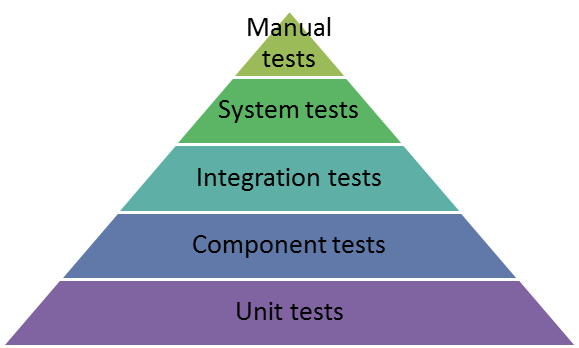
I’ll start by referencing the Test Pyramid:

Test Pyramid

The long and short of it is that we want to write more Unit tests than Component tests, more Component tests than Integration tests, and so on.


The Test Pyramid and Functional Programming

I’ve found functional programming to fit quite nicely into this paradigm — its emphasis on composition and pipelining means that a Component is quite often made up of a handful of composed Units, with multiple Components integrated together by composition once more. By testing each unit, we then feel sufficiently comfortable that we almost only need to smoke-test the component.

That is, if we have something like

let function1 = ...
let function2 = ...
let function3 = ...

let composite = function1 >> function2 >> function 3

and we thoroughly test function1, function2 and function3, we barely need to test composite. Granted, this security is partly due to the fantastic compile-time type system that F# gives us — the mere fact that the code above compiles is a reasonably strong indicator that the behaviour of composite is correct!

Having seen how good functional architecture leads us naturally on to good testing practices, let’s talk about the available testing tools in F#.


NUnit, NCrunch, and Unquote

Fans of C# might look at the above and think: well I know what the first two are, they are a formidable combination for continuous testing in Visual Studio, but how do they work in F#, and what is Unquote?

Taking a step back, if you are a .NET developer and don’t use NCrunch, start using it now!! Even if you aren’t doing Test-Driven Development, it will give you the confidence to know which bits of your code are tested, which aren’t, and whether your last one-line chance has broken anything. In terms of F# support, well, it just works like it does with C#!

The new boy on the block, Unquote, is pretty cool too. It uses two really nice features of F# that we haven’t looked a much yet, Code Quotations and Custom Operators. The resulting test syntax is beautiful and very readable — more that can be said about things like NUnit Assertions.

The easiest way to see it in action (other than trying it yourself) is to look at some real tests. Casting your mind back to the first bits of code we looked at last time, we had this function called StringToTokenList that took the contents of an Excel formula and turned it into a list of Token items that were strongly typed.

Here’s the first test for that function:

[<Test>]
let ``StringToTokenList 1+2``() = 
    StringToTokenList "1+2" =! [ Val(float 1)
                                 Operator Operator.Add
                                 Val(float 2) ]

A couple of nice things here are that:

  • We don’t have to bother with the tedious Arrange/Act/Assert pattern that pervades object-oriented tests. We simply write what we want to be taken as true, and use Unquote’s equality operator =!.
  • We can name the tests with as much verbosity as required, thanks to F#’s double-backtick notation. I’m not sure I am using this to full potential yet — maybe I’m stuck in the C# way of terse test names!
  • In this simple example I didn’t use a code quotation, but if the test setup were more complex I could do that rather than use a custom equality operator.
  • It’s a minor thing, but being able to initialise arrays using separate lines and no semi-colons is handy.

It carries on and gets more complicated — we can include whitespace, brackets, references, etc. in the expression, but the tests look exactly the same:

[<Test>]
let ``StringToTokenList multi digit integers``() = 
    StringToTokenList "( 123 + 321 )" =! [ LeftBracket
                                           Val(float 123)
                                           Operator Operator.Add
                                           Val(float 321)
                                           RightBracket ]

[<Test>]
let ``StringToTokenList A1 + A2 * BB312``() = 
    StringToTokenList "A1 + A2 * BB312" =! [ Ref { col = 1
                                                   row = 1 }
                                             Operator Operator.Add
                                             Ref { col = 1
                                                   row = 2 }
                                             Operator Operator.Multiply
                                             Ref { col = 54
                                                   row = 312 } ]

I’ve introduced you to the tools and frameworks I’ll use for testing, and hopefully you have some idea of what a Token list looks like, so let’s look at some more of the code tests before we move on to the working system!


Testing the Operators, Parser, and Calculator

I said last time that I had made the operators work on lists as well as numbers, and that it would be easy to extend this functionality to other types.

To test the Shunting-Yard algorithm, I was slightly naughty and used the example on the Wikipedia page. Here’s what my test looked like:

[<Test>]
let ``InfixToPostfix 5 + ((1 + 2) * 4) - 3``() = 
    InfixToPostfix [ Val (float 5)
                     Operator Operator.Add
                     LeftBracket
                     LeftBracket
                     Val (float 1)
                     Operator Operator.Add
                     Val (float 2)
                     RightBracket
                     Operator Operator.Multiply
                     Val (float 4)
                     RightBracket
                     Operator Operator.Subtract
                     Val (float 3) ]
    =! PostFixList([ Val (float 5)
                     Val (float 1)
                     Val (float 2)
                     Operator Operator.Add
                     Val (float 4)
                     Operator Operator.Multiply
                     Operator Operator.Add
                     Val (float 3)
                     Operator Operator.Subtract ])

Believe it or not, this one test managed to root out enough issue with my original implementation of the algorithm that all the subsequent tests passed first time — I guess that’s why it’s on the Wikipedia page!

For the raw operator functions such as add, I briefly experiemented with Property-Based Testing, but to be honest I struggled to grasp the nuances straight away. The code for those tests is here, and whislt it works for things like addition for which we have a good understanding of the required properties, I couldn’t easily translate it to higher-level concepts such as operator precedence.

The ‘normal’ tests I wrote were pretty basic, e.g.

[<Test>]
let ``Add x y works on values``() = Add (Val 1.0) (Val 2.0) =! Val 3.0

The calculator tests were slightly more interesting (but not much). Taking the previous example used to test the Shunting-Yard algorithm, we have

[<Test>]
let ``Calculate 5 + ((1 + 2) * 4) - 3 = 14``() = 
    Calculate(PostFixList([ Val(float 5)
                            Val(float 1)
                            Val(float 2)
                            Operator Operator.Add
                            Val(float 4)
                            Operator Operator.Multiply
                            Operator Operator.Add
                            Val(float 3)
                            Operator Operator.Subtract ]))
    =! ValResult(float 14)

Pretty basic tests — the idea of showing you some of them was to give a more intuitive feel of what the output code looked like.


System Tests: using the functions in Excel!

Excel Screenshot

The screenshot above shows a few examples of our calculator replicating Excel functionality, which serves to show that it does roughly what it should! The bottom example shows a vector calculation

RA Screenshot

This next shot shows something a bit more complex. If you look at the formula bar, you will see that it’s doing more than just arithmetic with numbers. It’s taking a reference to a cell containing 10,000 Monte Carlo simulations, performing a calculation on them to account for changes in exchange rates, and saving the results (10,000 new simulations) in a single cell.

Whilst this is very much a prototype, I think it’s a long way towards solving the problem that I originally wanted to solve. Sure, it needs a bit more TLC to be race-ready, but I think I’ve learned a decent amount about both Excel and F# in the process!


Next Time

Something a little different from the usual. I’ll be talking about the SOLID prinicples of object-oriented design and how they are much more compatible with functional programming that first meets the eye.

Monday, May 02, 2016

Excel calculations in F# - The Code, Part II

I promised a bit of a geek-out this time around; I hope you won’t be disappointed.

So far, we’ve seen how to take a general Excel expression of the form =Calculate(expression), extract the relevant bit of text from it using existing Excel interop libraries, and then put whatever result we get from the calculation back onto an Excel sheet.

All that’s left is the core of the matter: doing the calculation. The top-level code looks like this:

let rec CalcFormulaFromText = 
    StringToTokenList
    >> InfixToPostfix
    >> Calculate

At this stage it’s worth introducing some of the domain constructs that I created for the project. The first is that of a Token, which represents an individual unit that can be evaluated. I’ve used a discriminated union to model it as shown below.


The domain model, in brief

type Token = 
    | Operator of Operator
    | LeftBracket
    | RightBracket
    | ValList of float list
    | Val of float
    | Ref of Ref
    | Handle of string

where I’ve gone on to define the subtypes Ref and Operator as

type Ref = 
    { col : int
      row : int }

type Operator = 
    | Exponent = '^'
    | Divide = '/'
    | Multiply = '*'
    | Add = '+'
    | Subtract = '-'

A couple of questions probably cropped up as you scanned through these types:

  • Why are left and right brackets treated differently than other mathematical operators?
    • This is a particular quirk of the algorithm that I’m about to explain which is used in the InfixToPostfix function to convert our expression to Reverse Polish Notation. Basically, it strips brackets from the final form of the expression.
  • Why is Ref even included as a Token? After all, if it just points to another Excel cell, don’t we have the same problem of not being able to directly evaluate it?
    • A valid point. One of the first things I would do to refactor the solution would be to recurse over any references to other cells and replace the reference with the raw expression
  • What’s the obsession with float?
    • This is clearly unjustified, and was put purely for demo purposes. In reality I want to be able to deal with a more arbitrary type of value object, and would probably model things differently.

Parsing a string into a token list

Fundamentally though, I hope you understand the basic domain. We’ve got some operators, and some different kinds of stuff on which they can operate.

So how do we convert a plain old string to a list of these Token instances? I’d like to say that the code was simple, but it’s not. You can find the raw source in ExpressionParser.fs, and I’ll try to pick out some highlights of it here.

let readToken (ts : char list) = 
    match ts with
    | [] -> None
    | _ -> 
        let token = String.Concat(Array.ofList (List.rev ts))
        match token with
        | IsVal v -> Some(Val v)
        | IsRef r -> Some r
        | IsHandle h -> Some(Handle h)
        | _ -> None

let StringToTokenList(str : string) = 
    let rec handleOp op tail currentToken tokens = 
        let token = readToken currentToken
        match token with
        | None -> readChars tail (op :: tokens) List.empty
        | Some token -> readChars tail (op :: token :: tokens) List.empty

    and readChars chars tokens currentToken = 
        match chars with
        | [] -> 
            let token = readToken currentToken
            match token with
            | None -> tokens
            | Some token -> token :: tokens
        | h :: t -> 
            match h with
            | Op -> handleOp (Operator(asOperator h)) t currentToken tokens
            | Space -> readChars t tokens currentToken
            | LBracket -> handleOp LeftBracket t currentToken tokens
            | RBracket -> handleOp RightBracket t currentToken tokens
            | Other -> readChars t tokens (h :: currentToken)

    List.rev (readChars (Array.toList (str.ToCharArray())) List.empty List.empty)

These two functions, StringToTokenList and ReadToken, are the workhorses of the algorithm. The logic works roughly as follows:

  • Start with a string, represented by a list of characters.
  • Take the first character of the string.
    • If it’s an operator then add that to the output Token list
    • If it’s whitespace, ignore it and move onto the next character
    • Otherwise, put the character into a temporary local list and move onto the next.
  • Each time we add an operator to the list, we also check the temporary local list of characters and call readToken to figure out what it is. This function uses Active Patterns to see if we’ve got an int, float, etc.
  • Carry on doing this until the string is empty. At this point, figure out what it is we’ve got left.
  • After a final reverse, we end up with a list of tokens that correspond to our original string. Neat, huh?

The other cool thing is the way we set up our active patterns. Remember we’re treating all numbers as floating points, and so to see if the string we’ve got can be treated as one, we write

let (|IsVal|_|) str = 
    match Int32.TryParse(str) with
    | (true, int) -> Some(float int)
    | _ -> 
        match Double.TryParse(str) with
        | (true, float) -> Some(float)
        | _ -> None

Personally, I think this is a great way to figure out whether you’re dealing with a valid number, and much better than the C# equivalent.


Dijkstra’s shunting-yard

Now we’ve got a list of token items, how do we evaluate them? They’ve got all sorts of operators with different precedences, brackets, etc. You can probably guess the answer already: we can use shunting-yard algorithm to convert our Infix list to a Postfix (i.e. Reverse Polish Notation) list, at which stage the calculation becomes much easier (hint: we’ve done it before!!).

Without further ado, here’s my shunting-yard code:

type PostFixList = PostFixList of Token list

let InfixToPostfix ts = 
    let rec handleOperator operator tokens opStack outQueue = 
        match opStack with // add brackets to the Operator type?
        | [] -> readTokens tokens (Operator operator :: opStack) outQueue
        | Operator head :: tail -> 
            match associativity operator with
            | Left -> 
                if precedence operator <= precedence head then 
                    handleOperator operator tokens tail (outQueue @ [ Operator head ])
                else readTokens tokens (Operator operator :: opStack) outQueue
            | Right -> 
                if precedence operator < precedence head then 
                    handleOperator operator tokens tail (outQueue @ [ Operator head ])
                else readTokens tokens (Operator operator :: opStack) outQueue
        | _ -> readTokens tokens (Operator operator :: opStack) outQueue

    and transferOperators opStack outQueue = 
        match opStack with
        | [] -> outQueue
        | head :: tail -> 
            match head with
            | _ -> transferOperators tail (outQueue @ [ head ])

    and handleBrackets tokens opStack outQueue = 
        match opStack with
        | [] -> []
        | LeftBracket :: t -> readTokens tokens t outQueue
        | h :: t -> handleBrackets tokens t (outQueue @ [ h ])

    and readTokens tokens opStack outQueue = 
        match tokens with
        | head :: tail -> 
            match head with
            | Operator op -> handleOperator op tail opStack outQueue
            | LeftBracket -> readTokens tail (head :: opStack) outQueue
            | RightBracket -> handleBrackets tail opStack outQueue
            | _ -> readTokens tail opStack (outQueue @ [ head ])
        | [] -> transferOperators opStack outQueue

    PostFixList (readTokens ts List.empty List.empty)

One of the first things I did when coding this up was to tag my output type as a PostFixList to make absolutely sure I didn’t get it confused with my input list in the algorithm. This advanced type-safety was immeasurably helpful; I got the work done so much quicker for it, and with far fewer bugs.

The rest of the code is complicated but follows the logic of the Wikipedia article. it uses all the awesome bits of F#: mutual recursion, pattern matching, discriminated unions. I’ll admit it’s not readable but then again it’s not the kind of code that you write every day!


Finally, some actual calculation!

The final bit of the original top-level function does the final calculation. The evaluation code is pretty similar to the RPN calcualtor we did before:

let Eval(PostFixList ls) = 
    let solve items current = 
        match (current, items) with
        | Handle h, _ -> ValList(EvaluateHandleAsFloatList h) :: items
        | Ref r, _ -> (EvaluateReference r) :: items
        | Operator Operator.Add, y :: x :: t -> Add x y :: t
        | Operator Operator.Subtract, y :: x :: t -> Subtract x y :: t
        | Operator Operator.Multiply, y :: x :: t -> Multiply x y :: t
        | Operator Operator.Divide, y :: x :: t -> Divide x y :: t
        | Operator Operator.Exponent, y :: x :: t -> Exponent x y :: t
        | _ -> current :: items
    (ls |> List.fold solve []).Head

The one really great thing I managed to do here was to abstract addition, subtraction etc. from the main function. Rather than saying ‘when we have two things and the Add operator, do x + y, I wrote a custom function Add that is defined as let Add x y = ApplyInfixOperator x y (+), and then created an extensible way to add different types of values (int, float, list):

let rec ApplyInfixOperator x y op =         
    match (x, y) with
    | (Val xv, Val yv) -> Val(xv |> op <| yv)
    | (ValList xvs, Val yv) -> ValList(List.map (fun elt -> elt |> op <| yv) xvs)
    | (Val xv, ValList yvs) -> ValList(List.map (fun elt -> xv |> op <| elt) yvs)
    | (ValList xvs, ValList yvs) -> ValList(List.map2 (fun x y -> x |> op <| y) xvs yvs)
    | (Handle xh, Handle yh) -> ApplyInfixOperator (ValList(EvaluateHandleAsFloatList xh)) (ValList(EvaluateHandleAsFloatList yh)) op
    | (Handle xh, _) -> ApplyInfixOperator (ValList(EvaluateHandleAsFloatList xh)) y op
    | (_, Handle yh) -> ApplyInfixOperator x (ValList(EvaluateHandleAsFloatList yh)) op
    | _ -> raise InvalidInput

This relatively simple function is remarkably powerful: we have used it to do vector addition and multiplication, and can trivially extend it to matrix addition and multiplication, or whatever we like.

I think this might be the most important part of the whole project, as if I want to be able to add two instances of some internal type, all I need to do is add a branch to this function and we’re away.


Next Time

Whilst I haven’t mentioned it here, I tried to do a lot of the algorithm development using a test-driven methodology. Next time, we’ll look at some of the tests and more generally at F#’s support for testing frameworks. This should give a much more intuitive feel of what these Token lists and other domain concepts look like!

Friday, April 29, 2016

Excel calculations in F# - The Code, Part I

We’ve gone through the basics now — we want to do calculations in Excel, and we’re going to use ExcelDNA and F# to do it. The question now, is how.

I mentioned last time that our function must be able to deal with expressions that are already valid in Excel. If I write

=Calculate(expression)

and Excel knows what that expression is (i.e. give us all the intellisense and highlighting and ability to move boxes around to select cells), then we should be able to figure out what to do.

I decomposed this problem into three separate steps, and the top-level F# function reads as you see below. This, along with all the other code, can be found on Bitbucket.

let Calculate expr handle = 
    expr
    |> GetFormulaFromCell
    |> CalcFormulaFromText
    |> GetReturnValue handle

Overall, we can see how the functional-first style of F# leads us to:

  • prefer function composition
    • here we use the forward pipe operator |> which allows us to put the final argument to a function after the function rather than before, and is defined as let (|>) x f = f x
  • omit type declarations
    • there isn’t a single type declaration anywhere in my function, but hovering over it tells me the signature is 'a -> string -> obj, meaning a curried function that takes a value of any generic type, and a string, and returns an object
  • work naturally with Excel’s model.
    • by returning obj we are giving ourselves the capability to product a result of any type and then downcast it to be displayed by Excel, and by accepting a generic input we can handle text and references as well as raw numbers.

Ignoring the ‘handle’ variable for a second, we’ll briefly look at what each step entails:


GetFormulaFromCell

More composition and pipelining!

let GetFormulaFromCell expr = 
    expr
    |> GetCellText
    |> GetFormulaFromText

I hope that the general idea of what this function is trying to do is clear. It’s trying to get the actual formula that we want to calculate from the calling cell, and it has to do this in a slightly roundabout way — first, it gets the raw text of the calling cell, and then it gets the formula part of the cell.

Why do it like this? Unfortunately, Excel is too good sometimes. If I pass in =Calculate(1+1), then Excel will first do it’s own internal calculation of 1+1, and then call my code with the result: =Calculate(2). Not much use when you’re trying to take the thing in brackets and calculate it yourself!

To get around this, we have to go deep into Interop territory. Getting the raw cell text from the calling site is actually fairly painless once you’ve done it — we can get the reference to the caller, the application, and the active worksheet using ExcelDNA:

let callerRef = XlCall.Excel(XlCall.xlfCaller) :?> ExcelReference
let application = ExcelDnaUtil.Application :?> Application
let sheet = application.ActiveWorkbook.ActiveSheet :?> Worksheet

From this point we can get the formula:

let range = sheet.Cells.[callerRef.rowFirst+1, callerRef.columnFirst+1] :?> Range
let cellText = range.Formula.ToString()

As always I’ll ‘say what I see’ with regard to the code snippets and F# style:

  • The general way in which we interact with Excel is clean, and similar to the C# equivalents
  • Casting feels different: the dynamic downcast operator :?> appears all over the place, which is a byproduct of the lack of the dynamic keyword that is used in the equivalent C# code.
  • Although I haven’t shown it yet, dependency injection was painless. The way I abstracted this section of Excel-dependent code using a discriminated union was such a pleasant contrast to the interface-oriented way in C#

We know have the raw formula text of the cell, in this case =Calculate(expression). The second step allows us to get expression out of this, and looks pretty simple (getting the startOfSubstring and endOfSubstring values is also easy):

let GetFormulaFromText(text : string) = 
    text.Substring(startOfSubstring, text.Length - endOfSubstring text)

Now, at least, we have our expression!


CalcFormulaFromText

This is where the meat and bones of the work is done. I’m going to leave you hanging on this one: it’s sufficiently detailed and fun to merit its own post, which will follow this one. I will say now that it encompasses most of the topic we’ve already covered in F#, and a couple more such as active patterns and a little-known Dijkstra algorithm…


GetReturnValue

Once we’ve decided what the result of the calculation is, putting it back on the spreadsheet still requires a bit of work.

At this point I’ll return to the handle variable that I ignored earlier. Looking at the code now, it might be clearer what it’s purpose is: it’s simply a container for our result in the case that it refers to a complex object which we are unable to show in a cell.

type Result = 
    | ValResult of float
    | HandleResult of string
    | ValListResult of float list

let GetReturnValue handle result  = 
    match result with
    | ValResult v -> v :> obj
    | HandleResult h -> h :> obj
    | ValListResult vs -> Handler.StoreObject(handle, new InternalCaller(), vs) :> obj

This shows a number of features that we’ve already seen, but are worth repeating:

  • The combination of discriminated unions and pattern matching is formidable. Here, it gives us a hook to be able to deal with any result object that we want to have, and give it back to Excel
    • For example, we could add a branch that dealt with returning 2D arrays
    • Alternatively, as we do here, we store the result in memory using a simple object handler that has a backing Dictionary<string, object>.
  • We’ve had to cast to obj again, as we did when interactive with Excel earlier in the post. This is part of F#’s type system: a pattern matching statement must return the same type in each case, and we need to explicitly say that any old obj will do.

Next Time

We get to do some geeky stuff with parsers and algorithms and stuff.

The work so far has given us a pretty generic blueprint: we need to write a function that takes in a generic expression and returns a Result, which is a type over which we have the ability to add more cases.

Sunday, April 17, 2016

Excel calculations in F# - Tools and Requirements

So we want to be able to do better vector arithmetic in Excel.

As this is primarily about doing something in F#, that means we need some way of interfacing with it from .NET code. Enter Excel-DNA. For those unfamiliar, this is a fantastic open-source tool that let’s you create Excel add-ins, and I highly recommend reading their blurb.

Getting it up and running really is as simple as it suggests, which leaves us plenty of time to think about our requirements. At the core, we want to be able to write the following in the Excel formula bar

=Calculate(expression)

and have it correctly evaluate the expression in the following cases:

  • a constant, e.g. 1;
  • a standard arithmetic expressions e.g. 1+2;
  • a reference to another cell e.g. A1 or $BQ$192;
  • a vector e.g. {1;2;3};

and any combination of the cases above, the example in the previous post being =B2+C2 where B2={1;2;3} and C2={4;5;6}.

This elicits the first hard requirement: we’re going to need direct access to the raw text of the calling cell, and any cells that it references.

We can do this at a pretty low level using the Microsoft.Office.Interop.Excel namespace, which gives us direct access to things like workbooks, worksheets, cell ranges and cell formulas. Alternatively, we can harness Excel-DNA’s Integration package to perform a variety of tasks using the XlCall class. In a subsequent post I’ll show F# snippets using both techniques.

The second requirement should be fairly obvious: we need to be able to correctly calculate arithmetic expressions. Thankfully this is a well-trodden path, and involves the following:

  • Parse the incoming text and make sure it’s a valid expression (for example, no mismatched brackets or odd characters);
  • Convert the expression into a format from which it can be calculated (for example, to Reverse Polish Notation);
  • Evaluate the expression.

We’ll say much more about each of these steps from the perspective of F# and functional programming in the future, but suffice to say there’s no breakthrough in Computer Science with the above routine.

Finally, I’m going to introduce a requirement borne out of greed. If we can handle a reference to a vector, surely we can try and handle a reference to anything? From a code perspective, this is equivalent to saying something that fits a given function signature in F# (or implements a given interface in an OO language).

Expanding on this, what if we could:

  • store any .NET object via a user-defined function in Excel;
  • construct a method signature that allows evaluation of an expression involving such objects;
  • store the result of our computations in another .NET object; and
  • retrieve the results in a polymorphic fashion (constant, vector, matrix, …) with another user-defined function.

Much of this is helped by wrapping the Excel Object Handler, but it still sounds like a lofty goal.

In the next post, I’m going to start showing exactly how this is done.

Saturday, April 16, 2016

Excel calculations in F# - The Problem

I’ve been playing around with the more esoteric/academic features of functional programming for a couple of months now, so I think it’s about time to get some hands-on experience.

To do this, I set myself the task of choosing a mini-project to complete in F# — one that might have some real-world use!

I ended up settling on implementing a simple Excel expression parser. In this post I’ll introduce the problem that I want it to solve.


The Problem

I’m guessing you’re familiar with writing expressions in Excel. The program comes with a little formula bar that allows you to write expressions of varying complexity, precede it with the = key, and have it evaluated for you. Excel allows you to do all sorts of things here, but I’m going to focus on a bit of a gap in it’s functionality: vectors.

We begin with a simple question: how do we add two vectors of numbers in Excel? The concept of array formulas already exists, and indeed they get us to a solution pretty quickly. To add {1;2;3} to {4;5;6} we can do this:

Simple vector addition

So far this seems very straightforward. Referring to each vector in its entirety means we can do basic arithmetic on the vectors — addition, subtraction, multiplication, even exponentiation.

Let’s push the program a bit at this stage. Excel is used for a lot of financial modelling, and spreadsheets get very complicated very quickly in these applications. What if, instead of creating each vector explicitly and referring to it, we create it in a single cell as a one-dimensional constant.

If this sounds contrived, imagine that these are lists of 10,000 stock prices that we’re trying to analyse and that we’re getting them from a third-party source. Excel is incredibly resource-hungry — if we take these 10,000 numbers and paste them into 10,000 cells the resulting memory allocation from all the cell formatting etc. is huge compared to putting them all in one cell. Extend this over hundreds of rows in dozens of tabs and we might have a problem.

So, we want to store a vector in a single cell, another vector in another single cell, and add them together. Let’s see what Computer says:

Using a one-dimensional constant

No

This surprised me when I first saw it. After all, if you read the link above on one-dimensional constants, there are plenty of examples where they add and multiply these kind of things together. Even more strange is that we can do exactly what we want by putting both vectors directly into the third expression. To see what I mean, look at the picture below:

With formula expressions

I hope this makes it clear what problem I want to solve.

I want a generic way of being able to refer to array constants, do arithmetic on them, and have the result be another array constant that I can use.

This, I hope, will strike a chord with the hordes of finance professionals writing huge, slow Excel spreadsheets and wishing they could make them faster and more compact.


The Solution

Before I outline a proposed solution, if anyone reading this knows of a way to do what I'm trying to do already, please say so!

Not being an Excel developer, I’m going to stop short of implementing anything that messes with current Excel syntax. That is, I’m not going to make the exact formula you see in the picture above work.

Instead, I’m going to write a new function, let’s call it Calculate, that will do the job for us. More specifically, if we write =Calculate(A1 * A2 ^ A3 + A4) where A1, A2, A3 and A4 are all vectors of numbers, the result will be what we expect from following standard.


Next Time

I’ll introduce the tools that I’ve decided to use to write my Calculate function,.

Tuesday, February 16, 2016

Modulo Cons

We’re back with the second week of the Programming Languages course run by the University of Washington.

Once more, here are links to the notes, videos, and exercises. My solutions are on GitHub.


Pattern Matching and Recursion

Doing this exercises drilled home a couple of ideas that we’ve seen before: using pattern matching makes code so much neater, record types are great for defining lightweight pseudo-classes, and thinking recursively is hard when you aren’t used to it!

The contents of the notes and video are actually extremely useful and I could write a pretty long-winded piece on them alone, but here I want to focus on what I got out of trying the exercises.


Tail Recursion Modulo Cons

This gem of a concept cropped up in the very first question that I tried, which was:

Write a function all_except_option, which takes a string and a string list. Return NONE if the
string is not in the list, else return SOME lst where lst is identical to the argument list except the string
is not in it. You may assume the string is in the list at most once.

It came down to a case of two helper functions. For now, let’s forget that we can loop through the list once to do all the processing, and do it in two steps: first, find out whether the supplied string is in the list (i.e. the Any method that takes a predicate); then, if it’s found we remove the item from the list.

To match this logic I wrote two helper functions. The first was fairly easy to make tail recursive:

let found s ss = 
  let rec found_impl sl = 
    match sl with
    | [] -> false
    | h::t -> if h = s then true else found_impl t
  in found_impl ss

The second I found much harder, and ended up fruitless:

let remove_when_found s ss = 
  let rec remove_when_found_impl sl = 
    match sl with
    | [] -> []
    | h::t -> if h = s then t else h :: remove_when_found_impl t 
  in remove_when_found_impl ss

After some Googling, I realised that this second function was tail recursive modulo cons. After quite a lot more Googling, it seemed like the presented solutions on the blogosphere were less than transparent, so I left the function vulnerable to a Stack Overflow Exception.

It seemed like such a small change between the goals of the functions at first: recurse over the same list, check the same predicate, but the difference that returning a bool vs a List makes is significant.

I will return to this example when I understand the concept a lot better, and hopefully be able to write an elegant tail recursive solution.


Thoughts

My first foray into using pattern matching was good fun. I’m sure that I did plenty of things wrong and will improve both style and efficiency over time, but for now I am happy getting used to the new syntax and way of thinking.

Recursion is something that I have yet to quite grasp in my head — perhaps it is because one uses it so frequently in production code, but perhaps I just need to endeavour.

Next time, week three, promising First-Class functions and Closures.